

An AI social media content calendar is the single biggest unlock for small business owners in Chennai who know they should be posting consistently but never quite manage to. If your Instagram or Facebook page has long gaps between posts, followed by a burst of five posts in one afternoon before going quiet again, you are not alone, and you are not lacking discipline. You are missing a system. In 2026, AI-assisted content calendars have made it realistic for a one-person marketing team to plan, write, and schedule a full month of content in a single sitting, then let it run largely on autopilot for weeks at a time.
This guide breaks down what an AI-powered content calendar actually looks like in practice, which parts AI should handle and which parts still need your judgment, and how to set one up for your business this week, not “someday.” By the time you finish reading, you should have a concrete weekly template, a realistic plan for your first batch session, and a clear sense of how much time you can expect to get back once the system is running. It pairs well with a broader ChatGPT for digital marketing workflow, since the same AI tools that draft captions can help with almost every other content task too.
Why Consistency Beats Perfection on Social Media
Every algorithm across Instagram, Facebook, and LinkedIn rewards accounts that post regularly over accounts that post brilliantly but rarely. A steady stream of decent posts consistently outperforms a single viral attempt surrounded by silence, because platforms interpret consistent activity as a signal that an account is worth continuing to show to people. For a Chennai small business competing for local attention against dozens of similar accounts, this matters more than chasing a single perfect, high-production post that takes a week to produce and then sits alone for a month.
A calendar is a habit before it is a system, and most of that discipline gets learned the hard way. These are the things I wish I had known before starting out in digital marketing.
The Real Reason Most Small Businesses Fall Off
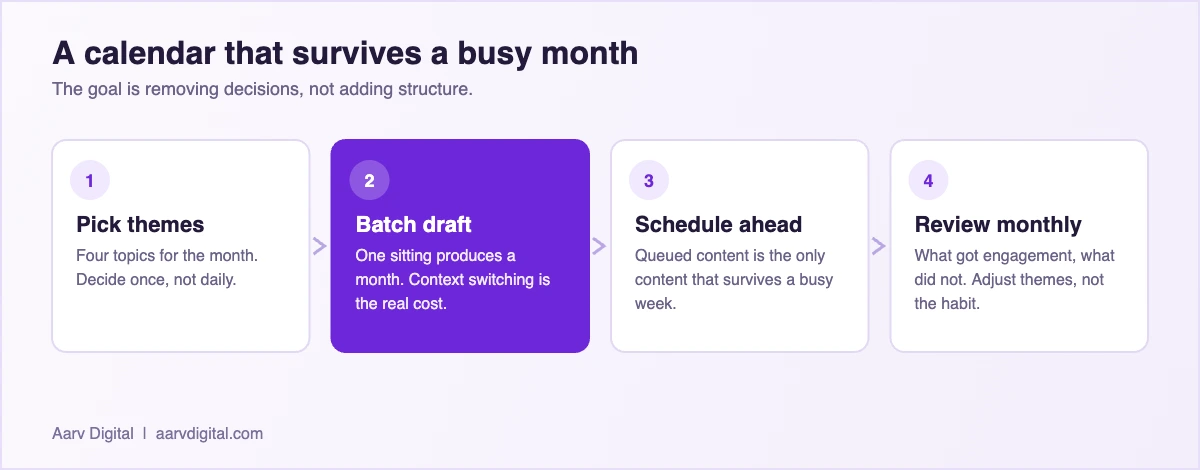
It is rarely a lack of ideas that kills a social media habit. It is the daily friction of opening an app, staring at a blank caption box, trying to think of something to say, and giving up because there are five other things demanding attention that day. A content calendar removes that daily decision entirely. The thinking happens once, in a single planning session, and execution becomes a matter of hitting approve on something that is already written, designed, and scheduled, rather than starting from a blank page every single morning.
What an AI Content Calendar Actually Does
An AI-powered content calendar is not simply a scheduling tool that posts at a set time, which social platforms have offered natively for years without any AI involved at all. The AI layer adds genuine planning and drafting help on top of scheduling: suggesting post topics based on your industry and the calendar month, drafting captions in a consistent brand voice, recommending the best times to post based on when your specific audience is actually active rather than generic advice, and flagging gaps in your calendar before they turn into a week of silence that quietly undoes months of consistency.
Bulk Planning Instead of Daily Improvising
The workflow that works best for most small businesses is batching: sitting down once a week or once a month, feeding an AI tool a rough list of topics, offers, and themes, and generating a full batch of draft posts in one sitting. You then review, edit for your voice, attach real photos, and load the whole batch into the scheduler at once. This single shift, from daily improvising to weekly or monthly batching, is what actually makes consistency sustainable rather than something you white-knuckle through for two weeks before quietly giving up, which is the pattern most solo business owners fall into without a structured system.
Building Your First AI-Assisted Content Calendar
Start smaller than you think you need to. A realistic goal for most Chennai small businesses is three to four posts a week across one or two platforms, not daily posting across five platforms, which almost always collapses within a month for a solo owner or a tiny team juggling marketing alongside actually running the business. A realistic AI social media content calendar starts small and grows from there.
Step One: Define Your Content Pillars
Before touching any AI tool, decide on three or four recurring content pillars, the broad buckets every post will fall into. For a digital marketing freelancer, that might be client results and case studies, practical tips business owners can use immediately, behind-the-scenes glimpses of the work, and occasional promotional posts about services. Having fixed pillars gives an AI tool something concrete to generate ideas against, rather than vague “give me a social media post” prompts that produce generic filler indistinguishable from any other business’s account.
Step Two: Generate a Month of Draft Ideas at Once
With your pillars defined, ask an AI writing tool to generate a month’s worth of post ideas and draft captions, cycling through each pillar in a predictable rotation. This produces roughly 12 to 16 draft posts in one sitting, far more efficient than writing them one at a time throughout the month, whenever inspiration happens to strike or, more often, doesn’t. You are not aiming for finished, polished captions at this stage, just solid drafts worth editing further.
Step Three: Edit for Voice and Attach Real Visuals
This is the step that separates content that performs from content that gets scrolled past without a second glance. AI-drafted captions tend to sound slightly generic until a human edits them with specific details: a real client name, with permission, a specific number instead of a vague claim, a turn of phrase you would actually say out loud to a customer standing in front of you. Pair every caption with a real photo or a simple branded graphic rather than stock imagery, since local audiences respond far better to faces and real spaces they recognize than to polished stock photography that could belong to any business anywhere.
A Practical Weekly Content Calendar Template
- Monday: A practical tip your audience can use immediately, tied to one of your content pillars
- Wednesday: Behind-the-scenes content, a project in progress, a team moment, or a process walkthrough
- Friday: A client result, testimonial, or a light, engaging question to drive comments
- One additional promotional post per week, clearly tied to a specific offer or service, not just “we do marketing”
- Two open, unplanned slots each month reserved for real-time content tied to whatever is actually happening in the business that week
- A short monthly review slot, ideally the same session where you batch the next month’s content, to check which pillars are performing
Choosing the Right Scheduling Tool
The scheduling layer matters less than the planning habit itself, but a good tool removes friction. Look for a drag-and-drop calendar view so you can see gaps at a glance and rearrange posts easily, the ability to schedule a full batch of posts in one session rather than one at a time, and built-in suggestions for optimal posting times based on your actual audience’s activity rather than generic advice repeated across every marketing blog. Most modern schedulers also offer a basic AI caption assistant built in, which is convenient, though a dedicated writing tool usually produces stronger drafts for anything beyond a quick caption tweak or a minor rewording. Buffer publishes a useful roundup of scheduling tools worth a look before you commit to one.
The tooling side of this moves fast. The current shortlist of AI tools for local business is where I would start if you are choosing a scheduler from scratch.
Multi-Platform Considerations
Instagram, Facebook, and LinkedIn each reward slightly different content styles, and a caption that works well on one rarely transfers directly to another without adjustment. AI tools can help adapt a single core message into platform-appropriate versions quickly, shortening a LinkedIn-style caption for Instagram or adding more context for a Facebook audience that skews slightly older and less caption-averse than Instagram’s. Resist the temptation to post the exact same text everywhere; a few minutes of platform-specific adjustment noticeably improves engagement without meaningfully adding to your total weekly workload.
Common Mistakes That Derail an AI Content Calendar
The most common failure mode is treating the AI-generated batch as finished work rather than a first draft. Posting fifteen captions in a row that all carry the same slightly stiff, generic AI phrasing is often more damaging to trust than posting inconsistently, since it signals that nobody is actually paying attention to the account. A second common mistake is over-planning: building an elaborate twelve-month content calendar with a rigid theme for every single day, which almost always collapses the first time a real business event, holiday, or opportunity does not fit neatly into the pre-planned slot.
Leaving No Room for Real-Time Moments
A content calendar should be a scaffold, not a cage. The best-performing posts for many small businesses are often the unplanned ones: a spontaneous customer reaction, a local event worth commenting on, a small win worth sharing the same day it happens. Build your calendar with two or three deliberately open slots each week specifically for this kind of real-time content, rather than filling every single day months in advance and leaving no flexibility at all.
| Approach | Sustainable? | What usually happens |
|---|---|---|
| Post when inspiration strikes | No | Three good weeks, then a two-month silence. |
| Daily posting from scratch | No | Burnout within a month for a one-person business. |
| Batch monthly, schedule ahead | Yes | Survives busy periods, which is the entire point. |
| Outsource entirely | Sometimes | Works if briefed well, sounds generic if not. |
| AI drafts, you edit | Yes | Fastest sustainable option. The edit is what makes it yours. |
Measuring What Actually Matters
It is easy to get distracted by likes, which are the least useful metric for a small business trying to generate actual leads rather than just visible engagement. Pay closer attention to saves, shares, comments, and profile visits that lead to a website click or a direct message, since these behaviors indicate someone was interested enough to take a next step rather than passively scrolling past without a second thought. Reviewing this monthly, alongside your content calendar, tells you which pillars are actually working and which ones to quietly retire in favor of something that resonates more.
Adjusting the Calendar Based on Performance
Treat your content pillars as a hypothesis, not a fixed rule carved in stone. If behind-the-scenes content consistently outperforms polished tip posts for your specific audience, lean into it and post more of it, even if it feels less “professional” than the content you originally planned. The data from your own account, not general best-practice advice from a marketing blog, should ultimately decide what stays in your weekly rotation and what gets phased out. This is exactly why an AI social media content calendar works best as a living document, not a fixed plan.
Repurposing One Piece of Content Across a Full Week
One of the most efficient tricks an AI content calendar enables is repurposing: taking a single piece of substantial content, a blog post, a client case study, a longer video, and breaking it into five or six smaller pieces spread across the week rather than treating each platform post as something that has to be created entirely from scratch. A single blog post about a marketing topic can become a carousel breaking down its main points, a short caption highlighting one statistic, a behind-the-scenes video of the idea being discussed, and a simple quote graphic pulling out the most quotable line.
Letting AI Handle the Breakdown
This is exactly the kind of repetitive, structured task AI tools handle well: feed in the original piece of content and ask for it to be broken into a week’s worth of shorter posts in different formats. You still need to review and adjust each piece, but generating the first draft of five posts from one source document takes minutes rather than the hour or more it would take starting from a blank page five separate times. For a solo business owner, this single technique alone can be the difference between running out of content ideas by week two and having a comfortable backlog stretching a month or more ahead.
Quick Tip
Set a recurring 90-minute block on your calendar, ideally the same day and time every week or every month, purely for content batching. Treat it with the same seriousness as a client meeting, and protect it from being the first thing that gets cancelled when the week gets busy. This single habit is the difference between businesses that post consistently for years and ones that restart their social media “strategy” every few months after a long, quiet gap.
How Much Time This Actually Saves
It is worth being concrete about the time savings, since “AI saves you time” is a vague enough claim to be almost meaningless without numbers attached. A business owner writing and scheduling social posts manually, one at a time, typically spends 20 to 30 minutes per post once you include finding a photo, writing a caption, choosing hashtags, and actually publishing it. Across four posts a week, that is somewhere between an hour and a half and two hours weekly, spread out in small, easily-interrupted chunks that tend to get skipped when the week gets busy.
A single monthly batching session using an AI tool to generate the first draft of every caption typically takes 90 minutes to two hours for a full month of content, roughly 12 to 16 posts. That is a meaningful reduction in total time, but the bigger win is not the raw hours, it is that the work happens once, in a single sitting, rather than being spread across the month as a recurring daily interruption that competes with actually running the business.
Frequently Asked Questions
How many posts per week should a small business actually aim for?
Three to four consistent posts a week on one or two platforms beats daily posting across five platforms that quietly stops after a month. Consistency over a longer stretch matters far more than raw volume in any given week.
Can AI write an entire month of captions without any editing?
It can generate a full batch quickly, but captions posted without a human editing pass tend to sound generic and interchangeable with any other business in the same industry. A short edit adding specific, real details each time makes a measurable difference in how content actually performs.
You need one central calendar of topics and pillars, then platform-specific versions of each post. Managing everything from a single master calendar, then adapting captions per platform, is far more sustainable than running entirely separate planning processes for each one.
What is the biggest mistake small businesses make with AI content calendars?
Posting AI-generated captions completely unedited. It is usually obvious to an audience within a few posts, and it quietly erodes the personal trust that makes a small, local business account feel worth following in the first place.
How far in advance should content be planned?
A month at a time is a good balance for most small businesses, long enough to batch efficiently, short enough to stay responsive to real-time opportunities, promotions, or local events worth posting about spontaneously as they come up.
Is it worth paying for a dedicated AI content calendar tool, or is a spreadsheet enough?
A spreadsheet works fine for planning topics and tracking what has been posted, and plenty of small businesses run a perfectly functional system this way for months before upgrading. Where a dedicated tool earns its cost is in the scheduling and caption-drafting layer, saving real hours every week once your posting volume grows beyond a handful of posts monthly and manually scheduling each one starts to feel like its own part-time job.
Ready to Build a Content Calendar That Actually Sticks?
If you are a local business owner or startup founder in Chennai looking to grow faster with smarter marketing, let’s talk. As the Best AI Digital Marketing Freelancer in Chennai, Arvind at Aarv Digital helps small businesses use AI to get more customers, save time, and scale sustainably.
Contact Arvind at Aarv Digital today to start your digital marketing growth journey — visit aarvdigital.com, follow Aarv Digital on LinkedIn, or reach out directly to book a free consultation.

Written by
Arvind Kumar
Founder of Aarv Digital, based in Chennai. Arvind helps local businesses and startup founders use AI to win more customers without adding headcount. New guide every three days.
Keep reading