If you are a startup founder trying to get your first hundred customers, Meta Ads for startups is one of the fastest ways to put your product in front of the exact people who are likely to buy it. Facebook and Instagram together reach billions of active users every month, and Meta’s ad system lets you target people by interest, behaviour, location, and even how closely they resemble your best existing customers. But most startups waste their early ad budget because they skip the fundamentals and jump straight into “boosting a post” or copying a competitor’s campaign without understanding why it works. This guide lays out the real foundation you need before you spend a single rupee on Meta Ads.
Why Meta Ads Matter for Early-Stage Startups
Unlike organic social media, which can take months to build an audience, Meta Ads let a brand-new startup show up in front of a warm, relevant audience within hours of launching a campaign. For a startup with a limited runway, this speed matters, which is exactly why Meta Ads for startups has become a default first channel for many founders. You are not waiting for an algorithm to slowly discover your page over years — you are paying to be seen by people who match your ideal customer profile today.
Meta Ads also give you something organic reach cannot: fast, structured feedback. Within a few days of running a campaign, you already know your cost per click, cost per lead, and which creative resonates. That data becomes the foundation for every future marketing decision, from product messaging to which customer segment to chase next.
The Three Things Meta Ads Solve for a Startup
Before diving into setup, it helps to be clear on what problem you are actually solving with Meta Ads:
- Awareness — getting your brand and product in front of people who have never heard of you.
- Consideration — driving traffic, video views, or engagement from people who are mildly interested but not ready to buy.
- Conversion — getting people to actually take an action: sign up, purchase, book a call, or fill a form.
Most startups make the mistake of running a single “conversion” campaign on day one, before they have any data, any pixel history, or any proof that their offer resonates. A stronger foundation starts with awareness and consideration, then moves to conversion once you have signal.
Setting Up Your Meta Ads Foundation Correctly
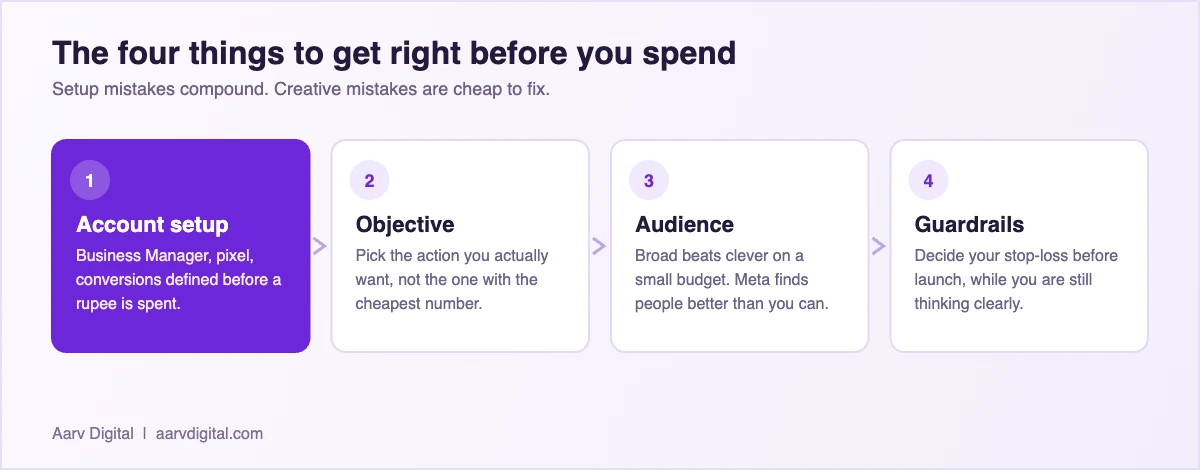
Before you create a single ad, there are structural pieces that need to be in place. Skipping these is the single biggest reason startup ad accounts underperform. For a deeper look at combining Meta with other paid channels, see our guide on AI-powered Google and Meta Ads optimization, which pairs well with the Meta Ads for startups approach covered here.
1. Meta Business Suite and Business Manager
Every serious advertiser should run ads through Meta Business Manager (business.facebook.com), not through a personal Facebook page’s “Boost Post” button. Business Manager gives you a dedicated ad account, proper billing controls, and the ability to add team members or freelancers without sharing personal login credentials. It also unlocks Meta’s more advanced targeting and reporting tools that are not available through the simplified boost flow.
2. The Meta Pixel and Conversions API
The Meta Pixel is a small piece of code placed on your website that tracks what visitors do after clicking your ad — whether they viewed a product, added to cart, or completed a purchase. Without the pixel installed and firing correctly before you launch, Meta’s algorithm has no data to optimize against, and your early campaigns will underperform no matter how good your creative is.
In 2026, Meta strongly recommends pairing the browser-based Pixel with the server-side Conversions API. Browser tracking alone is increasingly unreliable due to ad blockers, iOS privacy restrictions, and cookie limitations, so sending conversion events directly from your server closes the gap and gives Meta’s algorithm cleaner data to work with. If your website runs on Shopify, WordPress with WooCommerce, or a similar platform, most of these have official Meta integrations that handle both Pixel and Conversions API setup with a few clicks.
3. Campaign Structure: Campaign, Ad Set, Ad
Meta’s ad platform is organized in three tiers, and understanding this structure is non-negotiable for any startup founder running their own ads:
- Campaign level — this is where you choose your objective (Awareness, Traffic, Engagement, Leads, Sales, App Promotion). This single choice shapes how Meta’s algorithm finds and shows your ad to people.
- Ad Set level — this is where you define your audience, budget, schedule, and placements (Feed, Stories, Reels, Marketplace, Audience Network).
- Ad level — this is the actual creative: the image, video, headline, and copy that people see.
A clean campaign structure keeps your data readable. Running too many overlapping ad sets targeting similar audiences splits your budget and confuses the algorithm — a mistake that is very common among first-time advertisers.
A Simple Starter Structure for a New Startup Account
If you are launching your very first Meta Ads campaign, resist the urge to build a complicated funnel on day one. A simple, disciplined starting structure looks like this:
- One campaign with a Traffic or Engagement objective to warm up the account and gather initial signal.
- One or two ad sets using Meta’s Advantage+ Audience (broad targeting, letting Meta’s algorithm find relevant people) rather than five narrow, overlapping interest-based audiences.
- Three to five genuinely different ad creatives inside that ad set, so Meta has enough variety to test and find a winner.
- A modest daily budget you are comfortable testing with for at least seven days before making changes.
Quick Tip
Give every new campaign at least 3–4 days before judging performance. Meta’s delivery system needs time to exit the “learning phase,” and changing your budget, audience, or creative too early resets that learning and wastes the data you have already paid for.
Choosing the Right Objective for a Startup’s First Campaign
Meta groups objectives around three funnel stages, and choosing correctly at the outset saves a lot of wasted spend later.
Awareness and Traffic Objectives
If your startup is brand new and has zero pixel data, starting with a Traffic or Engagement objective for one to two weeks is often smarter than jumping straight to Sales. This builds an initial audience of people who have interacted with your brand, which you can later retarget with a conversion-focused campaign at a much lower cost.
Leads and Sales Objectives
Once you have some pixel data — even a few hundred website visits — you can move to a Leads or Sales campaign. Meta’s algorithm will use the signals collected from your Traffic campaign to find people more likely to convert, which typically produces a noticeably lower cost per result than launching a cold Sales campaign from zero data.
Audience Targeting Basics Every Founder Should Know
Meta offers three broad ways to build an audience, and a healthy startup account usually uses a mix of all three over time.
- Core Audiences — built from demographics, interests, and behaviours you select manually.
- Custom Audiences — built from your own data: website visitors, email lists, or people who engaged with your Instagram or Facebook page.
- Lookalike Audiences — audiences Meta builds automatically by finding people who resemble your existing customers or website visitors, once you have enough data (typically a minimum of 100 people in your source audience).
Early on, most startups rely on Core Audiences and Meta’s Advantage+ Audience feature, since Custom and Lookalike audiences need existing data to work well. As your pixel collects more signal over the first few weeks, layering in retargeting (a Custom Audience of website visitors who did not convert) is usually the single highest-ROI addition you can make.
Common Mistakes Startups Make With Their First Meta Ads Campaigns
Watching early-stage founders run their first campaigns, the same handful of mistakes show up again and again:
- Launching a Sales campaign with no pixel history and expecting immediate low-cost conversions.
- Using only one ad creative, giving Meta’s algorithm nothing to test or optimize between.
- Targeting five or six overlapping narrow audiences instead of one broad, well-optimized ad set.
- Changing the budget or creative every day instead of waiting for the learning phase to complete.
- Sending traffic to a slow, unoptimized landing page instead of the app or website experience the ad promised.
Fixing even two or three of these mistakes typically has a bigger impact on cost per result than any “secret targeting trick” — the fundamentals matter far more than most founders expect.
| Objective | What Meta optimises for | Right when |
|---|---|---|
| Engagement | Likes and comments | Almost never for a startup. Cheap numbers, no customers. |
| Traffic | Clicks to your site | You genuinely just need visitors, which is rarer than it sounds. |
| Leads | Form submissions on Meta | You want volume and can handle lower intent. |
| Conversions | Actions on your own site | Your pixel works and you know what a conversion is worth. |
| Sales | Purchases | You sell online and have enough volume for the system to learn. |
Setting Realistic Guardrails Before You Launch
One habit that separates disciplined founders from those who burn through their runway on ads is setting guardrails before the campaign goes live, not after the results come in. Decide in advance what your maximum acceptable cost per result is, based on your unit economics — if a customer is worth ₹2,000 in lifetime value, you need to know at what cost per lead or cost per sale the campaign stops being profitable. Write this number down before you launch, so a bad week does not tempt you into panic-changing the campaign or, worse, doubling the budget to “make it work.”
None of this happens in isolation. Paid social sits inside a wider shift in how small businesses buy and use marketing technology, and the rundown of AI marketing trends is worth reading alongside this one.
It also helps to decide your testing runway upfront. A common approach for a startup’s first Meta Ads campaign is to commit to a fixed budget over 10–14 days purely for learning, with the explicit understanding that the goal of this phase is data, not profit. Founders who treat the first two weeks as a paid research exercise tend to make far better decisions in month two than those who expect immediate returns from day one.
Frequently Asked Questions
How much should a startup spend on Meta Ads to start?
Most startups can begin testing with a modest daily budget, but you need enough spend to gather meaningful data — generally a budget that allows for at least 50 conversion events per week per ad set for Meta’s algorithm to exit the learning phase efficiently. Starting too small for too long simply delays useful data.
Do I need the Meta Pixel if I only run ads for app installs?
For app promotion, you use the Meta SDK and App Events instead of the website Pixel, but the underlying principle is identical — Meta needs reliable event data from your app to optimize delivery, so this should be set up and tested before spending on ad campaigns.
Should a startup hire an agency or run Meta Ads in-house first?
Running your first few campaigns in-house, even imperfectly, helps you understand your own customer data and what messaging resonates before you hand strategy over to an agency. Many founders find that a hybrid approach — learning the fundamentals themselves, then bringing in expert help to scale — produces the best long-term results.
What is Advantage+ Audience and should a startup use it?
Advantage+ Audience is Meta’s broad-targeting option where you provide minimal targeting inputs and let Meta’s algorithm find relevant people using its own signals. For most new startup accounts without much historical data, this typically outperforms narrow, manually built interest audiences.
How long before a Meta Ads campaign starts showing real results?
Expect a learning and testing period of at least one to two weeks before you have enough data to make confident decisions. Judging a campaign after two or three days is one of the most common reasons founders think Meta Ads “don’t work” for their business.
Can a startup with a very small budget still get value from Meta Ads?
Yes, but expectations need to be realistic — a small budget means slower data collection and a longer learning phase. Focus on one clear objective, one well-defined audience, and a handful of strong creatives rather than spreading a small budget across multiple campaigns.
Understanding Meta Ad Formats Before You Design Your First Creative
Part of the foundation for Meta Ads for startups is knowing what formats are available before you brief a designer or shoot a video. Meta supports several ad formats, and each one suits a different stage of the funnel.
Image Ads
The simplest format — a single static image with headline, primary text, and a call-to-action button. Image ads are quick to produce and work well for testing multiple offers or headlines cheaply before investing in video.
Video Ads
Video consistently outperforms static images for engagement and cost efficiency on Meta in 2026, especially short, vertical, sound-off-friendly clips of 15–30 seconds. For a startup, even a simple screen-recording demo of your product or a short founder-to-camera clip often performs better than a polished, expensive production.
Carousel Ads
Carousels let you show multiple images or videos in a single ad, each with its own link. This format works particularly well for startups with multiple products, features, or use cases to showcase, since it lets the viewer swipe to the specific benefit that resonates with them.
Collection and Advantage+ Shopping Ads
For e-commerce startups, Collection ads and Advantage+ Shopping campaigns combine a hero video or image with a scrollable product catalogue underneath, letting Meta’s algorithm automatically show the most relevant products from your catalogue to each viewer.
Placements: Where Your Ads Actually Show Up
Meta ads can appear across Facebook Feed, Instagram Feed, Facebook and Instagram Stories, Reels on both platforms, Facebook Marketplace, and the Audience Network of partner apps and websites. Each placement has different aspect ratio expectations — Feed favours 1:1 or 4:5, while Stories and Reels are built for full-screen 9:16 vertical video.
New advertisers are usually best served by choosing “Advantage+ Placements,” which lets Meta automatically distribute your budget across the placements performing best for your objective, rather than manually selecting one or two placements before you have any performance data to justify the choice.
Measurement: The KPIs a Startup Founder Should Actually Watch
It is easy to get lost staring at vanity metrics like reach or impressions. For a startup trying to make disciplined decisions with limited cash, a small set of numbers matters far more:
- Cost Per Result — whatever your objective is (a lead, a purchase, a sign-up), this is the number that tells you whether the campaign is economically viable.
- Click-Through Rate (CTR) — a low CTR usually points to a creative or targeting problem, not a landing page problem.
- Conversion Rate on your landing page — a high CTR but low conversion rate usually means the ad is attracting the wrong audience, or the page experience does not match what the ad promised.
- Frequency — how many times, on average, the same person has seen your ad. Rising frequency alongside falling performance is a sign of creative fatigue.
Reviewing these four numbers weekly, rather than checking the dashboard obsessively every few hours, keeps decision-making calm and rational — which matters just as much as any targeting setting when you are working with a limited startup budget.
Building the Right Foundation Before You Scale
Getting the foundation right — Business Manager, Pixel and Conversions API, a clean campaign structure, and a realistic testing budget — is what separates startups that scale their Meta Ads spend profitably from those that burn cash and give up after one bad week. Once this foundation is solid, the next steps are about creative strategy and campaign ideas, and then about budgeting and scaling spend intelligently — both of which we cover in the next two posts in this series.
And if you would rather not run this yourself while also running the business, that is a reasonable call to make. It is the work I do day to day as an AI digital marketing freelancer in Chennai.
If you are a local business owner or startup founder in Chennai looking to grow faster with smarter marketing, let’s talk. As the Best AI Digital Marketing Freelancer in Chennai, Arvind at Aarv Digital helps small businesses use AI to get more customers, save time, and scale sustainably.
Contact Arvind at Aarv Digital today to start your digital marketing growth journey — visit aarvdigital.com or reach out directly to book a free consultation.

Written by
Arvind Kumar
Founder of Aarv Digital, based in Chennai. Arvind helps local businesses and startup founders use AI to win more customers without adding headcount. New guide every three days.
Keep reading