
Google Ads for Small Businesses is the fastest way to appear in front of someone who is already looking for what you sell. That is the whole argument for it, and it is a strong one. Social ads interrupt people who were scrolling. Search ads meet people who typed “emergency plumber near me” at eleven at night. The intent is completely different, and so is the conversion rate.
It is also the channel where small businesses waste the most money, usually within the first fortnight. This guide covers what actually works for a Chennai business with a modest budget, what the platform will push you towards that you should resist, and how to tell within thirty days whether it is working. As the Best AI Digital Marketing Freelancer in Chennai, this is the account structure I set up most often.
Why Search Ads Still Beat Social for Local Businesses
For a local service business, Google Ads has one structural advantage that no social platform can match. Your customer has already decided they need something. They are not being persuaded, they are choosing between options. That shortens the path from click to enquiry dramatically.
The practical effect shows up in the numbers. Social traffic for a local service business typically needs several touches before an enquiry. Search traffic often converts on the first visit, because the person is mid-decision. That does not make search better in every case. It makes it better for anything urgent, anything researched, and anything where the customer already knows the category name.
Where search is the wrong choice
If nobody is searching for what you sell, Google Ads will not create demand. A new product category, an impulse purchase, a visually driven business like a boutique or a cafe, all of these do better on Meta Ads, where you can reach people who were not looking. Spending search budget to create awareness is the most expensive way to do the cheapest job.
The honest comparison
Most small businesses that do both well end up splitting roughly seventy thirty in favour of search in the early months, then rebalancing as they learn which produces better customers rather than merely cheaper clicks. If you are running both, the guide to optimising Google and Meta Ads together covers how to divide budget without double counting conversions.
What Google Ads Actually Costs a Small Business
There is no single answer, but there are reliable patterns worth knowing before you set a budget, because the platform will happily spend whatever you give it.
The daily budget trap
Google asks for a daily budget and then spends up to twice that on any given day, balancing across the month. Owners routinely set what feels comfortable per day, then panic at the weekly spend. Set the daily figure at roughly a thirtieth of what you are genuinely willing to lose in a month, and treat the first month as tuition rather than investment.
Cost per click varies enormously by category
Competitive professional services, legal, insurance, and anything finance adjacent command the highest clicks. Trades, local repairs, tuition and food services sit considerably lower. The useful number is not cost per click at all, it is cost per enquiry, and a category with expensive clicks and a high close rate can be far cheaper per customer than the reverse.
The minimum that makes sense
Below a certain spend the account never gathers enough data to optimise, and you are paying for noise. If the budget is too small to generate a meaningful number of clicks per week in your category, put the money into local SEO and your Google Business Profile instead, where the same amount buys lasting visibility rather than a fortnight of traffic.
Choosing the Right Campaign Type
This is where most small accounts go wrong on day one, because Google’s setup flow actively steers you towards the campaign type that suits Google rather than the one that suits you.
Search campaigns: start here
Standard search campaigns give you the most control and the clearest feedback. You choose the keywords, you see the search terms, you learn what customers actually type. For a first account this is almost always the right choice, even though the interface will suggest otherwise.
Performance Max: powerful and opaque
Performance Max spreads budget across search, display, YouTube, Gmail and Maps using automation, and it can work well once an account has conversion history. On a new account it is a black box that spends your money with very little visible reasoning. Resist it until you have several months of clean conversion data for the system to learn from.
Local campaigns and call-only
For businesses where the goal is a phone call or a visit, call-only ads and campaigns tied to your Business Profile often outperform standard search, because they remove a step. A plumber does not need a landing page visit, they need the phone to ring. Match the campaign type to the action you actually want.
| Campaign type | Control you get | Good for | When to avoid |
|---|---|---|---|
| Search | High. You pick keywords and see search terms. | A first account, and any service with clear demand. | Almost never. Start here. |
| Performance Max | Low. Google decides placement and bidding. | Accounts with months of clean conversion data. | New accounts. It spends without showing its reasoning. |
| Call only | Medium. Optimised for one action. | Trades and urgent services where the goal is the phone ringing. | Anything needing explanation before contact. |
| Display | Low. Broad reach, weak intent. | Remarketing to people who already visited your site. | Cold prospecting on a small budget. |
Keywords Without Wasting Budget
Keyword selection is the single biggest determinant of whether a small account survives its first month. The mistakes here are predictable and entirely avoidable.
Match types, in plain terms
Broad match tells Google to use judgement about what is related, and on a small budget that judgement will spend your money on tangential searches. Phrase and exact match keep you closer to what you chose. Start narrow, see what converts, then widen deliberately. Starting broad and narrowing later means paying for the education.
Negative keywords are not optional
Every account needs a negative list from day one. The universal ones are “free”, “cheap”, “jobs”, “salary”, “course” and “how to”, because each attracts people who will never buy. Then add your own weekly, by reading the actual search terms report. This one habit separates accounts that improve from accounts that plateau.
A starting negative keyword list for most local businesses
- free, cheap, low cost for people who are price shopping below your floor
- jobs, salary, vacancy, recruitment for jobseekers rather than customers
- course, training, tutorial, how to for people planning to do it themselves
- wholesale, bulk, supplier unless that is genuinely your market
- the names of cities you do not serve, which quietly drain budget on a local account
Quick Tip: Read your search terms report every Monday for the first month, without exception. It is the only place the platform shows you what people actually typed rather than what you hoped they would type. Fifteen minutes a week here will save more money than any other single habit in a new account.
Writing Ads That Earn the Click
You are writing for someone scanning four near-identical results in about two seconds. Cleverness loses to clarity every time, and the ad that wins is usually the one that answers the unspoken question fastest.
Put the thing they searched for in the headline. If someone typed “AC repair Velachery”, an ad that says “AC Repair in Velachery” will beat one that says “Chennai’s Most Trusted Cooling Experts” almost every time, because the first confirms they are in the right place. Relevance also lowers your cost per click, so this is a double win.
Then give one concrete reason to choose you. Same-day service. Fifteen years in the area. Free inspection. Fixed pricing. One specific claim outperforms three vague ones. And use every asset the platform offers, sitelinks, callouts and call extensions, because they cost nothing and take up more of the screen, pushing competitors further down.
The Landing Page Problem
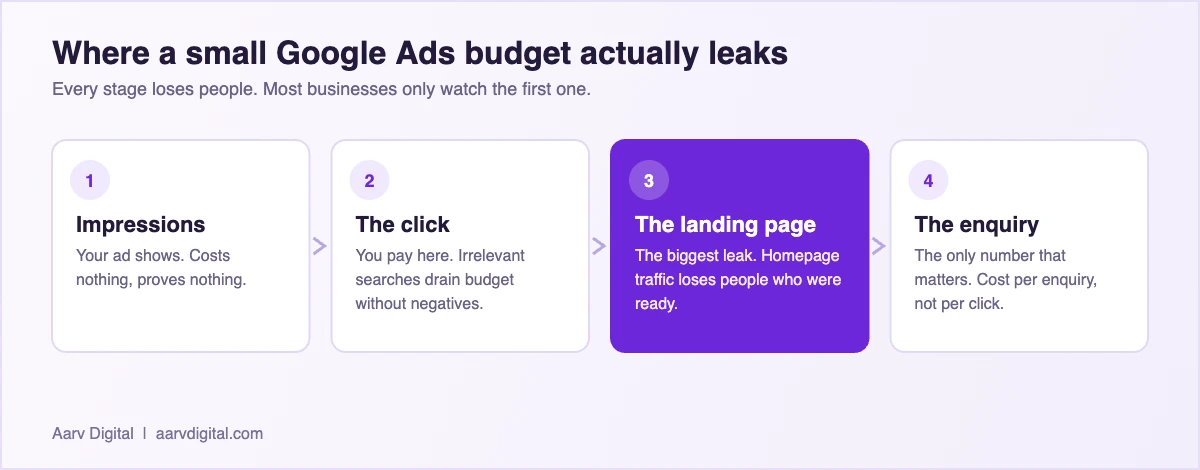
Most small business ad budgets are lost after the click, not before it. The ad does its job, the person arrives, and the page they land on asks them to work too hard.
Sending traffic to your homepage is the most common version of this. The homepage is a menu. Someone who searched for one specific service does not want a menu, they want that service, with the price range, the area covered and a way to make contact visible without scrolling. Every extra decision loses a percentage of them.
The fix is unglamorous. One page per campaign, matching the promise in the ad, with a phone number and a WhatsApp link visible immediately. If you cannot build that, point the ad at your most relevant existing service page rather than the homepage, and at minimum make sure the contact route is above the fold on a phone.
What to Measure in the First 30 Days
New accounts generate a lot of numbers and very little signal. Ignore most of it and watch four things.
- Cost per enquiry, not cost per click. Clicks are an input, enquiries are the output you actually buy.
- Search terms quality. What share of triggered searches were genuinely relevant. Under half means your match types are too loose.
- Enquiry to customer rate. If ads produce enquiries that never close, the problem is the offer or the audience, not the campaign.
- Impression share lost to budget. Tells you whether you are capped by money or by relevance, which are entirely different problems.
Resist changing things daily. Google’s system needs a stable period to learn, and an account that gets rewritten every three days never leaves the learning phase. Weekly reviews, monthly structural changes. For the wider framework on connecting spend to revenue, see the guide to measuring marketing ROI with AI.
Common Mistakes That Drain Small Budgets
The first is running ads with no negative keywords, which means paying for jobseekers, students and DIYers indefinitely. The second is sending every campaign to the homepage, which wastes the click you just paid for. The third is accepting every recommendation the platform suggests, since those recommendations optimise for spend rather than for your profit.
The fourth is subtler and more expensive. Businesses judge the account on cost per click and congratulate themselves when it falls, while cost per customer quietly rises. Cheaper clicks from less relevant searches is not an improvement, it is a slower leak.
Frequently Asked Questions
How long before Google Ads starts working?
Expect meaningful data within two to three weeks and a reliable read at thirty days. The first week is almost always the worst, because the account is learning and your negative keyword list is still thin. Judging the channel on week one is the most common reason businesses quit too early.
Should I run Google Ads or improve my SEO first?
If you need enquiries this month, ads. If you need enquiries next year at lower cost, SEO. Most small businesses need both, which usually means ads for immediate cash flow while local SEO and your Business Profile build in the background. They are not competitors, they work on different timescales.
Can I run Google Ads myself without an agency?
Yes, for a straightforward local business with a handful of services. The platform is not the hard part, discipline is. If you will genuinely read the search terms report weekly and resist the automated suggestions, you can run a clean account yourself. If you will not, the money is better spent on someone who will.
Do I need a website to run Google Ads?
Technically you can run call-only campaigns pointing at a phone number, and for some trades that works well. But without a page, you lose the ability to explain, to show proof, and to capture anyone not ready to call immediately. A single well-built service page is usually a better investment than a full site.
How much should a Chennai small business budget monthly?
Set it by what an enquiry is worth to you rather than by what feels affordable. Work out your average customer value and your close rate, and you have the maximum you can pay per enquiry. A budget that cannot produce a meaningful number of clicks per week in your category is too small to learn from, and that money does more work in local SEO.
Does AI help with Google Ads or is it hype?
It genuinely helps with the writing and the sorting: generating ad variations to test, drafting negative keyword lists, summarising search term reports and spotting patterns you would miss. It does not replace the judgement about what your customer actually values, and accounts run entirely on automation tend to spend more for worse customers.
Getting the First Thirty Days Right
Google Ads rewards patience and punishes fiddling. Start narrow, watch the search terms, build your negative list, send traffic to a page that matches the promise, and judge the account on cost per customer rather than cost per click. Do those five things and you will be ahead of most small accounts in your category.
Structuring the Account So It Stays Manageable
Account structure sounds like an advanced topic and is actually the thing that decides whether you can still understand your own account in three months. Small businesses tend to end up with either one campaign containing everything, or forty campaigns nobody maintains. Both fail for the same reason: you cannot see what is working.
One campaign per service, one budget per priority
If you offer three services and one of them is where the money is, that service deserves its own campaign with its own budget. Bundling them means your best service subsidises your weakest, invisibly, and you will not notice for months. Separate campaigns let you starve what is not working without touching what is.
Tight ad groups beat large ones
An ad group should contain keywords close enough that a single ad can speak to all of them honestly. If you cannot write one headline that suits every keyword in the group, the group is too broad. This is the mechanism behind relevance, and relevance is what lowers your cost per click over time.
Location settings deserve five minutes of attention
The default setting targets people “interested in” your location as well as those physically in it, which for a Chennai service business means paying for clicks from other cities. Change it to presence only. This single setting quietly wastes a meaningful share of local budgets and takes under a minute to fix.
Get these three right at setup and the account stays legible. Get them wrong and every later optimisation is guesswork, because you will never be able to tell which part of the spend produced which result.
If you are a local business owner or startup founder in Chennai looking to grow faster with smarter marketing, let’s talk. As the Best AI Digital Marketing Freelancer in Chennai, Arvind at Aarv Digital helps small businesses use AI to get more customers, save time, and scale sustainably.
Contact Arvind at Aarv Digital today to start your digital marketing growth journey, visit aarvdigital.com or reach out directly to book a free consultation.

Written by
Arvind Kumar
Founder of Aarv Digital, based in Chennai. Arvind helps local businesses and startup founders use AI to win more customers without adding headcount. New guide every three days.
Keep reading